Edit your videos creatively
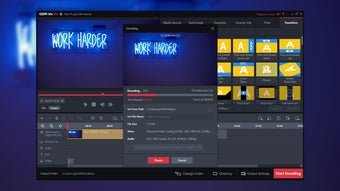
GOM Mix Pro is a free multimedia program that enables you to easily edit videos. Developed by GOM Lab, this software is designed to be user-friendly, with an accessible interface that saves time in navigating the available tools. Despite having “Pro” in its name, this program is a free version. There’s only one permanent payment setup for the full version but you need an add-on package to unlock some usable media.
Top Recommended Alternative

What is GOM Mix Pro?
GOM Mix Pro is a highly-versatile video editor that offers both basic and advanced tools for any type of user. From the simple trim, crop, and split functions to the more in-depth text and image formatting, almost everything you can expect from a video editor is available here. While there are not a lot of built-in tooltips here like the other GOM products, you can still access an online user guide directly on the menu and see the full documentation of this software.
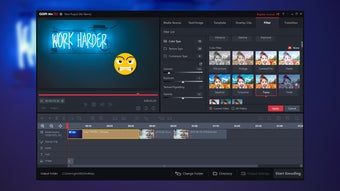
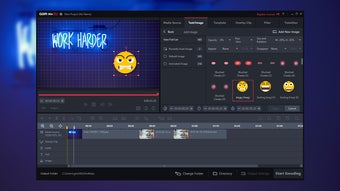
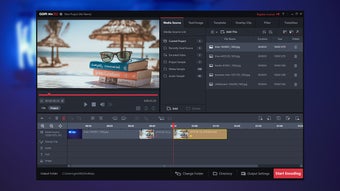
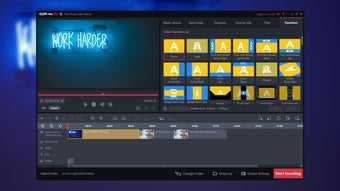
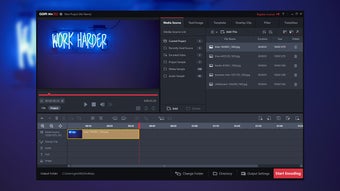
Its user interface contains all of the necessary editing sections in plain sight. There are three overall areas: the Preview Screen on the top left, the Sources & Effects on the top right and opposite of the Preview Screen, and the Timeline Pane on the bottom of the two. You can start right away by dragging and dropping the files from the Sources & Effects area. The free version features tons of preset options but some of them have to be unlocked with the paid version first.
Choose whatever you like
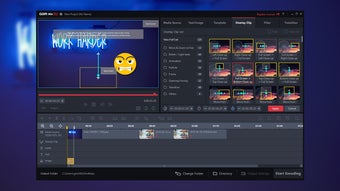
In the Preview Screen, you can find the playback slider and its controls, Play, Stop, 1 Second Backward, and 1 Second Forward. There are two viewing modes available here: Clip Mode, which plays the selected clip or media, and Project Mode, which plays all clips. You can also screen-capture whatever is on the preview. If you add text and images, you can manually move their placement on the Preview Screen—even adjust their size and rotation by clicking and dragging.
The Sources & Effects section has the most number of features on it. There are 6 major tabs: Media Source, Text/Image, Template, Overlay Clip, Filter, and Transition. Media Source displays all the multimedia files, encoded videos, and preset samples you can use on the software. Text/Image contains the text editor tool and clip art collection. Meanwhile, Template, Overlay Clip, Filter, and Transition are mostly the same in how they can look animated but differ in the types of effects they produce on the videos.
Not complicated to use
The Timeline Pane, on the other hand, has 7 layers. The first has the usual tools, like Undo and Redo, Trim, Delete, Select Area, and Volume Control. The far-right side of it has the option to start a new project, import, save, and export. The second layer enables you to zoom in and out and shows the duration. The remaining 5 layers are each for the media source, overlay clip, audio, text, and image—allowing you to overlap all elements together.
This handy editor is considerably low cost but impressive in how much it can deliver. If you’d like to unlock all available free media here, however, you need two things: Full Version and Extra Package. These just differ in whether you’ve previously used the free version. If you have, just buy the Full Version license and get Extra Package to unlock everything. Both remove the ads, watermarks, and limitations on encoding. You can also get this editor as a bundle with other GOM programs.
Great for post-production
Overall, GOM Mix Pro doesn’t disappoint with how it offers. Not only does it provide templates and effects for free, but it’s also flexible with most of the popular video file standards. It even allows you to upload directly to YouTube and Google Drive. You can’t customize its theme to other colors but other than that, it’s great and easy enough for complete beginners to pick up.